You just launched a “Free Marketing Audit” campaign. It went viral. You’re receiving 100 leads per day.
This should be the best problem you’ve ever had. Instead, it’s a nightmare.
Here’s why: Typeform pricing punishes success. The Basic plan ($29/month) caps you at 100 responses per month. You hit that limit in one day. To handle your volume, you need the $59/month plan. To see why people are abandoning your form halfway through - the form analytics that would actually help you fix it - you need the $99/month plan.
And here’s the kicker: the form only collects the data. You still have to manually read 100 rows in a spreadsheet, identify the “high ticket” clients from the tire-kickers, and draft personalized replies. That’s another 3 hours of your day, gone.
This is what I call the Success Penalty. The more successful you become, the more SaaS companies charge you for the same features. Your success funds their growth, not yours.
I refused to pay it.
Instead, I built a free Typeform alternative in 30 minutes using Mocha (free to start, takes seconds to sign up). Not a mockup. A real, deployed AI form builder with:
- Unlimited form responses (no artificial caps)
- A “studio” form builder with live mobile preview
- Drop-off analytics that show exactly where leads abandon your form
- AI-powered lead scoring using GPT-5-mini
- One-click email drafts customized to each lead
Total monthly cost: $0 (plus your own OpenAI API usage, which runs less than $0.0003 per lead).
Let me show you exactly how I did it. (See the live demo)
What You’ll Build
In 30 minutes, you’ll have a complete Typeform alternative with:
- Unlimited form responses (no per-response pricing)
- A professional “studio” form builder with live preview
- Drop-off analytics showing exactly where leads abandon your form
- AI-powered lead scoring and automated email drafts
- Total cost: ~$1/month (your OpenAI API usage)
Replaces: Typeform Pro ($99/month) + AI features they don’t offer at any price.
Get started with Mocha for free and skip to Phase 1, or read on to understand why Typeform pricing is broken.
Why I Needed a Free Typeform Alternative
Before we start, let’s break down Typeform pricing and what we’re replacing:
| SaaS Feature | Typeform Pricing | What You’re Actually Paying For |
|---|---|---|
| Unlimited Responses | $59/mo (Growth tier) | Removing an artificial limit |
| Form Analytics & Drop-offs | $99/mo (Pro tier) | A bar chart |
Annual cost of Typeform Pro: $1,188. And that still doesn’t include AI lead scoring - Typeform simply doesn’t offer it.
By the end of this tutorial, you’ll have a complete Typeform alternative with all these features. For free.
What We’re Building: A Lead Generation Form with AI
To prove the AI form builder features work, we’ll build a specific lead generation form - a “Growth Audit” that agencies use to pre-qualify consulting leads.
The 5 Questions:
- Confidence (Rating 1-10): “How confident are you in your marketing?”
- Revenue (Multiple Choice): “Monthly Revenue?” (Options: Under $1k, $1k-$10k, $10k-$50k, $50k+)
- The Bottleneck (Long Text): “What is the #1 thing stopping your growth?”
- Budget (Multiple Choice): “What is your budget to fix this?”
- Contact (Email): “Where should we send the plan?”
Question 3 is the goldmine - it’s the free-text input that our AI will analyze. Question 4 is the trap - we’ll discover it’s killing our conversions.
Let’s build.
Phase 1: The SaaS Foundation (The Vault)
Every heist starts with the vault. Ours is a proper multi-tenant architecture where:
- Each user owns their own forms and data
- API keys are stored securely (not in plaintext)
- Usage limits protect against runaway costs
This foundation is what separates a “toy project” from a “business asset.”
• Data Structure: Create tables for
Forms, Questions, Submissions, and Answers. Ensure Forms belong to a User. • User Settings: Create a User_Settings table linked to the User. This must securely store an openai_api_key (masked text) and a daily_budget (number). • Admin Layout: Create a clean, minimalist dashboard with a Sidebar (Forms, Analytics, Settings). • Form Builder: Inside a Form, let me add question types: Short Text, Long Text, Multiple Choice, Rating (1-10), and Email. • Style: Use a clean, professional light theme (white/gray/black). Do not use gradients or dark mode defaults. Keep it simple.Paste this into Mocha and watch it work. (New to AI prompting? Check out our guide to getting results with AI builders.) In about 60 seconds, you’ll have:
- A complete database schema with proper relationships
- A settings page for your OpenAI key and daily budget
- A form builder with all the question types you need
- A clean, professional interface
Savings Unlocked: Phase 1
| Feature | Replaces | Value |
|---|---|---|
| Unlimited Responses | Typeform Growth Essentials | $59/mo |
| Running Total | $59/mo |
You just eliminated the “success penalty.” No more paying extra because your marketing worked.
Phase 2: The “Studio” Experience (Design Logic)
Here’s what separates amateur tools from professional ones: feel.
Marketers hate abstract databases. They want to see their form while they build it. They want changes to feel instant, not laggy. They want the experience of using Figma, not phpMyAdmin.
We’re going to demand that experience in plain English.
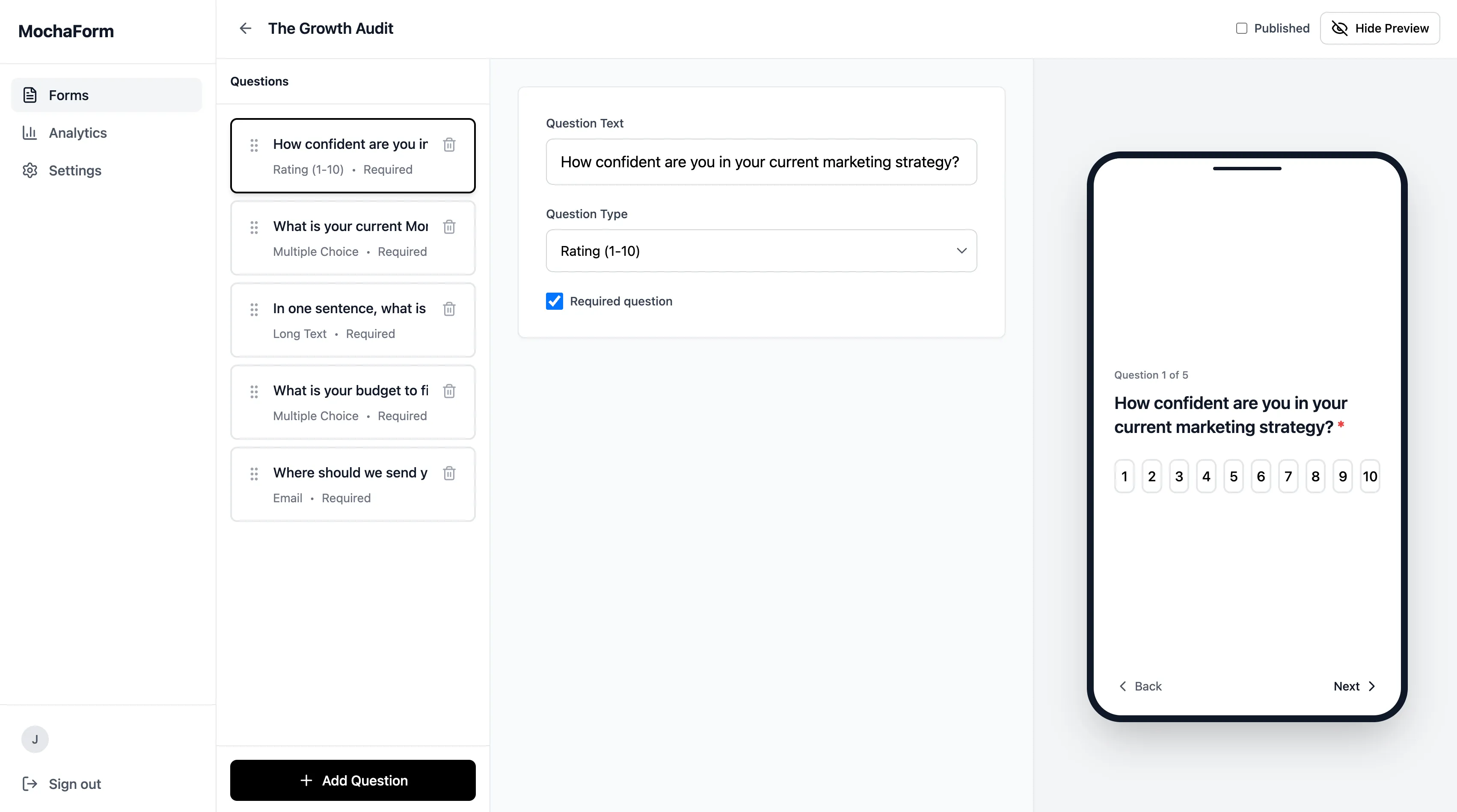
The Admin "Studio" (Builder View): • Split Layout: On the LEFT, show the list of Questions as "Cards" that I can drag and drop. On the RIGHT, show a Live Mobile Preview. • Workspace Control: Add a prominent "Toggle Preview" button in the top toolbar. Clicking it should hide/show the mobile preview panel. • Form Admin Editing: It must feel instant. When I type text, do not save to the database on every single letter. Instead, update the preview instantly, but wait until I stop typing for a moment to save. When I check a box or change a dropdown, switch it instantly on the screen while saving in the background.
The Public Form (
/form/:id): • Focus Mode: Show only one question at a time, centered. • Auto-Advance: If the user clicks a Rating or Option, slide instantly to the next question. • Keyboard Control: Support Enter to go next and A/B keys for choices. • State Persistence (Crucial): If the user clicks Back, preserve their previous answer. • Animation: Use buttery smooth transitions between slides.This prompt is dense because UX details matter. Let’s break down what you’re getting:
The Admin “Studio”:
- A split-screen builder with drag-and-drop question cards on the left
- A live mobile preview on the right that updates as you type
- Optimistic UI updates (changes appear instantly, save in background)
The Public Form:
- One-question-at-a-time focus mode (like Typeform)
- Auto-advance when users click options
- Keyboard shortcuts for power users
- Smooth animations between questions
The difference between a $29/month tool and a $99/month tool often comes down to these UX details. You just got them for free.
Savings Unlocked: Phase 2
| Feature | Replaces | Value |
|---|---|---|
| Unlimited Responses | Typeform Growth Essentials | $59/mo |
| Professional “Studio” UX | Typeform Growth Essentials | (included) |
| Running Total | $59/mo |
Phase 3: Drop-Off Tracking and Form Analytics
Here’s the question that $99/month answers: “Where are people giving up?”
I suspected my “Budget” question was scaring people away. Asking someone how much they’re willing to spend before you’ve demonstrated value feels aggressive. But I needed proof - not a hunch.
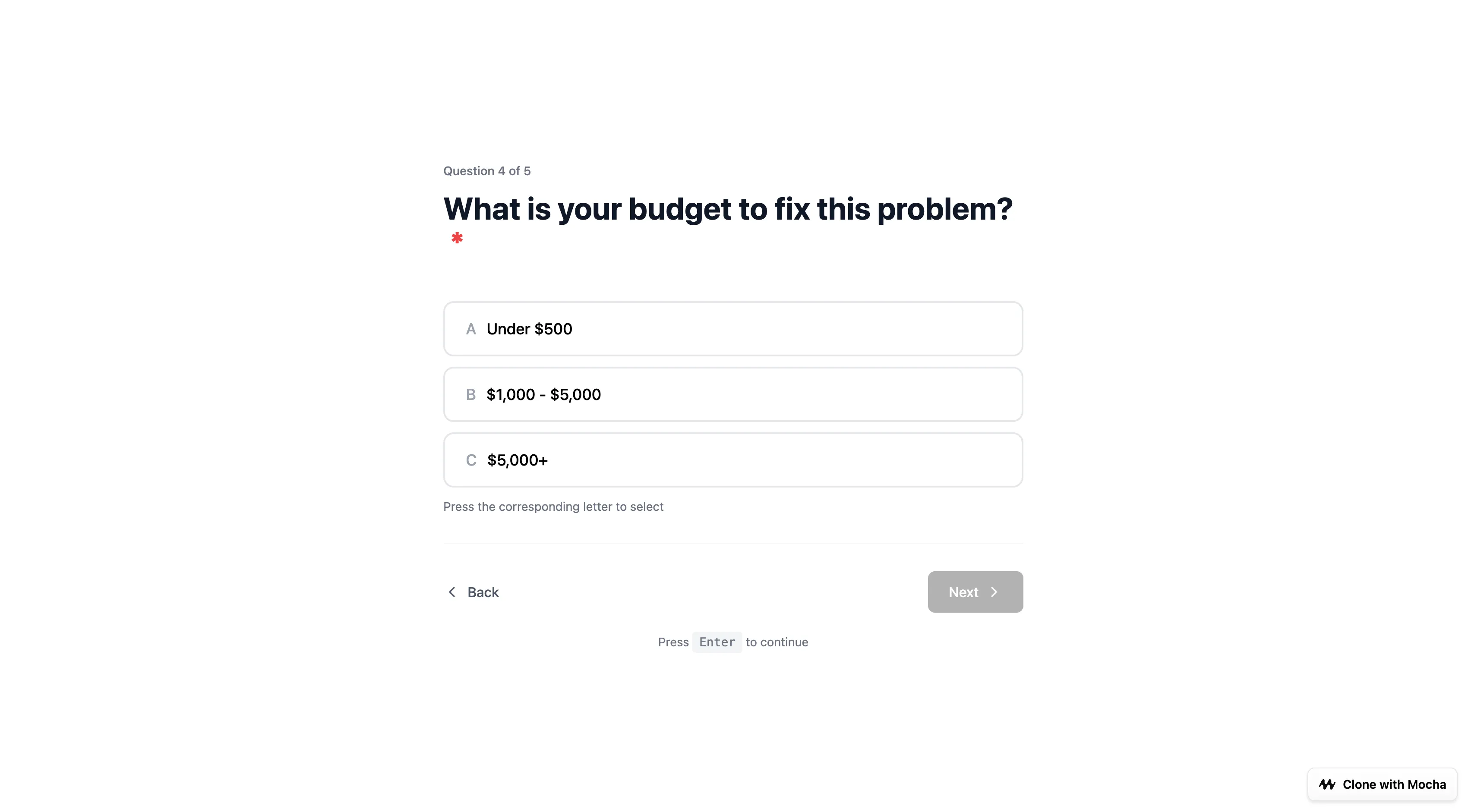
Typeform hides form analytics behind their Pro tier pricing. We’re going to build drop-off tracking ourselves.
• Analytics Logic: When a user starts a form, track their session. Record the furthest question they viewed. • Analytics UI: In the Dashboard, add an "Analytics" tab. Show a funnel chart calculating the drop-off % for each question. Highlight the highest drop-off in Red. • Backend Security: When I eventually run AI tasks, the system must look up the
User_Settings for the Form Owner, use their stored openai_api_key, and if the key is missing or the daily_budget is exceeded, return a clear error.After deploying this update, I sent the form to my email list and waited 24 hours. The results were brutal - and exactly what I needed to see.
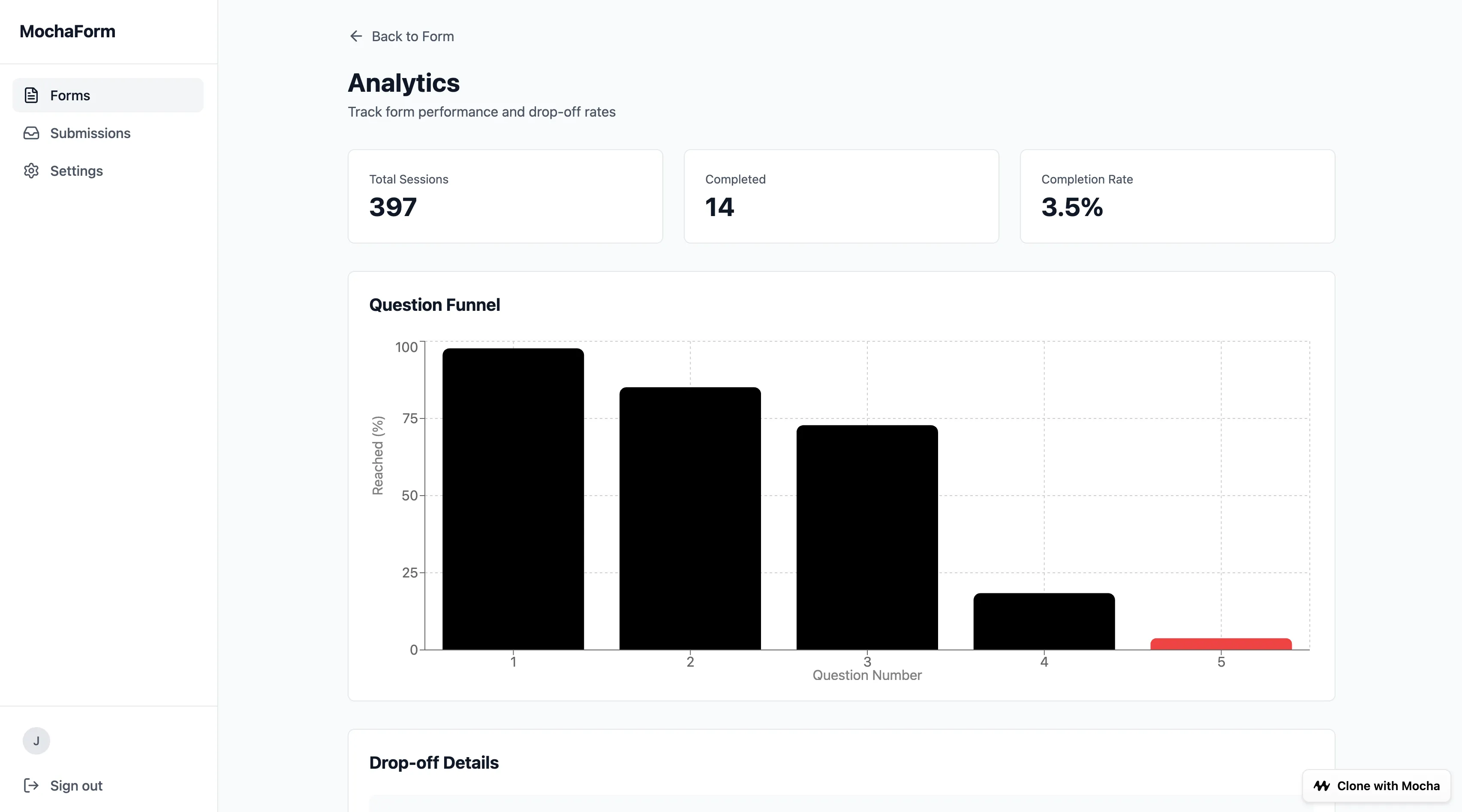
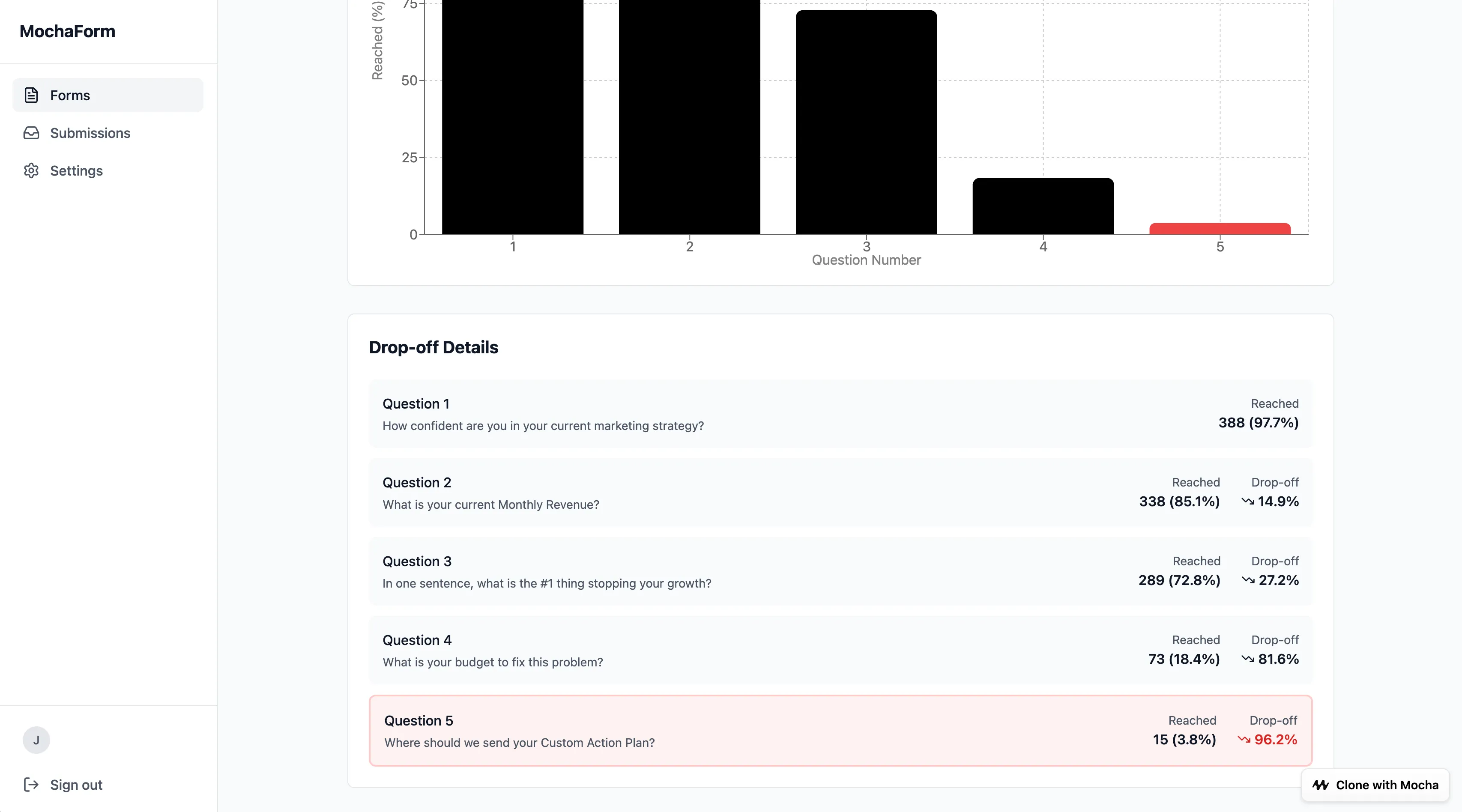
The Data Told the Story:
- Questions 1-3: Gradual decline (97.7% → 85.1% → 72.8%)
- Question 4 (Budget): 81.6% drop-off - the cliff
- Question 5: Only 3.8% of visitors made it here
My hunch was right. The budget question was killing conversions. But now I had data to prove it - and I could A/B test solutions.
(The fix? I moved the budget question to a follow-up email after providing initial value.)
Savings Unlocked: Phase 3
| Feature | Replaces | Value |
|---|---|---|
| Unlimited Responses | Typeform Pro | (included) |
| Professional “Studio” UX | Typeform Pro | (included) |
| Drop-off Analytics | Typeform Pro | $99/mo |
| Running Total | $99/mo |
Phase 4: AI Lead Scoring and Automated Follow-ups
Collecting data is easy. Acting on it is hard.
With 100 leads per day, I was spending 3 hours just reading submissions, trying to identify which ones were worth a phone call. The high-value leads got buried under tire-kickers asking for free advice.
This is where AI earns its keep. We’re going to build a “Sales Sniper” that:
- Scores every lead (0-100) based on their answers
- Explains its reasoning with green flags and red flags
- Drafts a personalized email reply ready to send
- Does it all in under 2 seconds per lead
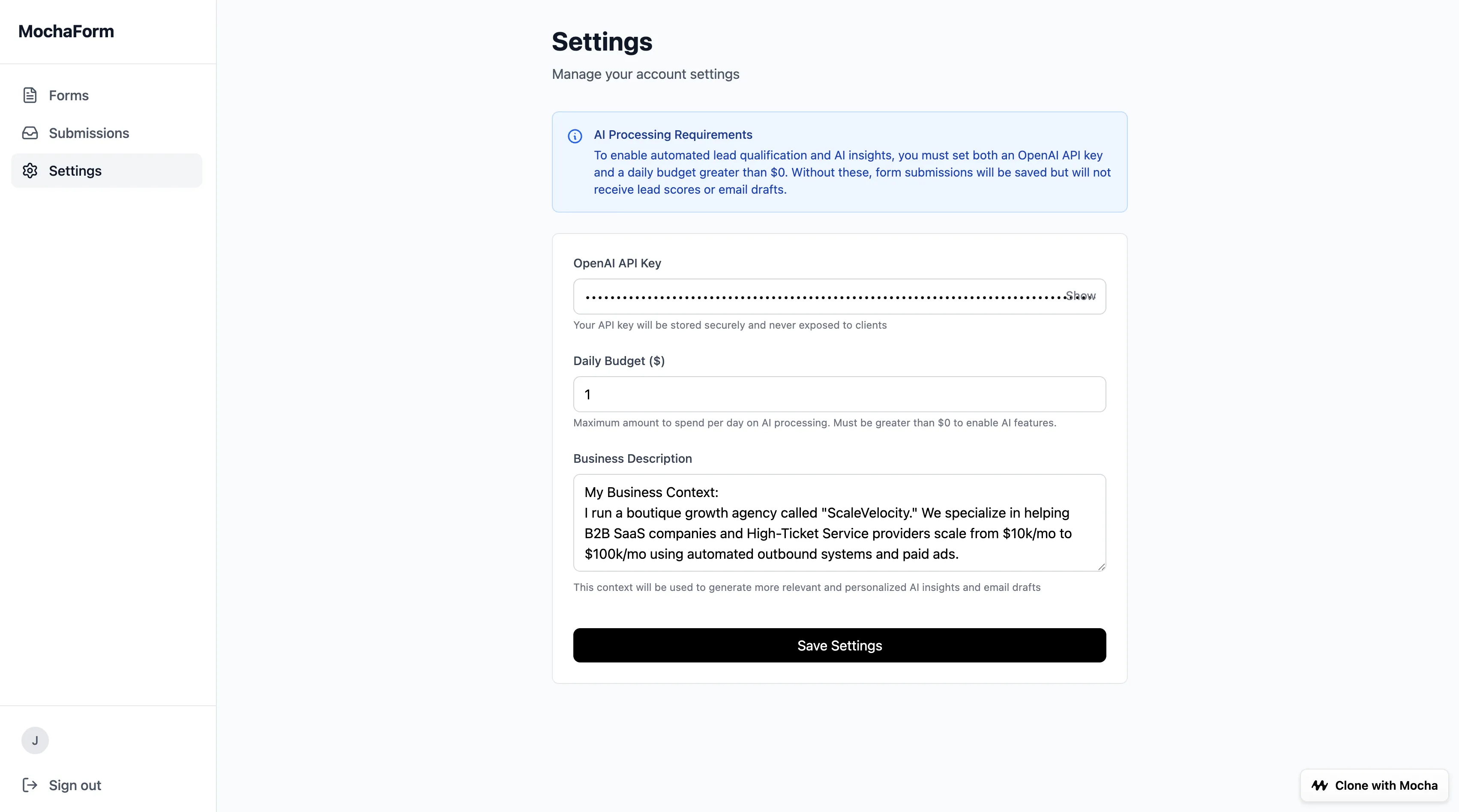
• System Brain (Context): Add a "System Instructions" text area to the Form Settings page. This is where I will paste my business persona, e.g., "I run a B2B Agency". • Trigger & Safety: When a submission is finished, check the
daily_budget. If safe, proceed. • The AI Task (Structured Output):- Score: Assign 0-100 based on Revenue and Confidence.
- Breakdown: Do NOT write a paragraph. List 2-3 "Green Flags" (pros) and 2-3 "Red Flags" (cons).
- Draft: Write the email reply based on my System Instructions. • The UI (Lead Intelligence Dashboard): Update the Submission Detail view.
- Top: Display the Lead Score and the Action as a Badge.
- Middle: Show the Green/Red Flags list (Scannable).
- Bottom: Display the Email Draft in a large text box with a prominent "Copy to Clipboard" button.
The key innovation here is structured output. Instead of getting a wall of text from the AI, we demand specific fields:
- A numerical score (sortable, filterable)
- Bullet points (scannable in 3 seconds)
- A suggested action (no decision fatigue)
- A draft email (one click to use)
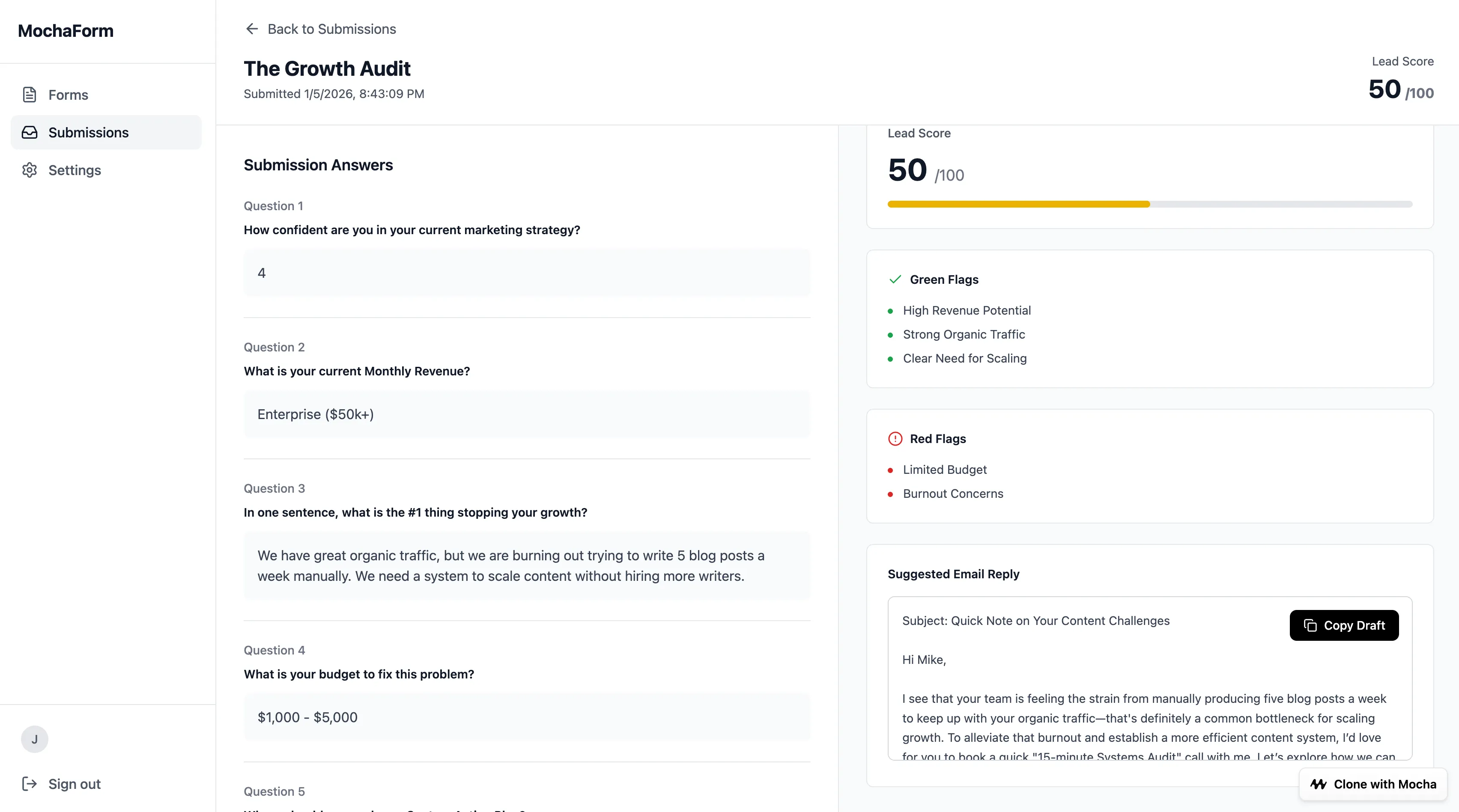
Now when a lead submits, I see:
- Score: 70/100 - Worth my time
- Green Flags: Revenue $10k-$50k, High confidence (8/10), Clear pain point
- Red Flags: Budget unclear, Vague timeline
- Draft Email: A personalized response referencing their specific bottleneck
One click to copy. One click to send. What used to take 3 hours now takes 15 minutes.
The Cost of Intelligence (Important)
Let’s talk about the economics of “Bring Your Own Key” (BYOK).
The Good:
- You pay OpenAI directly (no markup)
- GPT-5-mini costs less than $0.0003 per lead (a fraction of a penny)
- 100 leads/day = less than $1/month in API costs
The Safety Rails We Built:
- Daily budget limits prevent runaway costs
- The system checks budget before every API call
- You can disable AI entirely and still have a fully functional form
The Reality Check: If you’re processing 100 leads/day with AI scoring, you’re looking at:
- Form platform: $0 (Mocha)
- AI processing: less than $1/month (OpenAI)
- Total: less than $1/month
Compare that to $99/month for Typeform Pro alone - and they don’t even offer AI lead scoring.
Savings Unlocked: Phase 4
| Feature | Replaces | Value |
|---|---|---|
| Unlimited Responses | Typeform Pro | (included) |
| Professional “Studio” UX | Typeform Pro | (included) |
| Drop-off Analytics | Typeform Pro | (included) |
| AI Lead Scoring + Drafts | Not available on Typeform | Bonus |
| Typeform Pro Equivalent | $99/mo |
What’s Next: 3 Upgrades You Can Build in 10 Minutes
This app is yours. You aren’t stuck with what I built. Here are three features you can prompt right now to increase value:
1. The “Zapier Killer” (Webhooks)
Send form data to any external system - your CRM, Slack, Airtable, whatever.
2. The “Revenue Generator” (Stripe Payments)
Turn your form into a paid consultation booking system.
3. The “Logic Master” (Conditional Branching)
Skip irrelevant questions based on previous answers.
Each of these would cost $20-50/month extra with traditional form builders. With Mocha, they’re a single prompt away.
The Final Tally
| Feature | Typeform Pro | MochaForm (You Built) |
|---|---|---|
| Unlimited form responses | $99/mo | $0 |
| Professional builder UX | included | $0 |
| Drop-off analytics | included | $0 |
| AI lead scoring | Not available | $0 |
| Automated email drafts | Not available | $0 |
| Monthly Cost | $99 | ~$1 (API) |
| Annual Cost | $1,188 | ~$12 |
You didn’t just clone Typeform Pro - you built something they can’t sell you. Their product collects data. Yours acts on it.
Frequently Asked Questions
Is Typeform free?
Typeform offers a limited free tier, but it caps you at 10 responses per month - unusable for any real business. Once you need unlimited responses, form analytics, or drop-off tracking, you’re looking at $59-99/month. This tutorial shows you how to build a free Typeform alternative with all those features for ~$1/month in API costs.
What is the best free Typeform alternative?
The best free alternative depends on your needs. If you want a no-code solution with unlimited responses, form analytics, and AI features, building your own with Mocha (as shown in this tutorial) gives you the most value. You replace Typeform Pro ($99/month) and get AI features Typeform doesn’t offer at any price - all for less than $1/month in API costs.
How much does Typeform actually cost?
Typeform pricing starts at $29/month (Basic) for 100 responses. Most businesses need the $59/month Growth plan for unlimited responses, or the $99/month Pro plan for analytics and drop-off tracking. Add AI lead scoring via third-party tools (Zapier + integrations), and you’re easily at $500+/month.
Can I build forms without coding?
Yes. This entire tutorial uses Mocha, which is free to start and lets you build full-stack apps using natural language prompts - no coding required. You describe what you want in plain English, and Mocha generates the database, UI, and logic automatically. The four prompts in this article took about 30 minutes total to build a complete lead generation platform.
How do I track where people drop off my form?
Traditional form builders hide drop-off analytics behind expensive tiers ($99/month on Typeform). In this tutorial, Phase 3 shows you how to build drop-off tracking that records each user’s session and visualizes exactly which question causes the most abandonment - with the highest drop-off highlighted automatically.
Your Move: Build Your Free Typeform Alternative
You just built something better than Typeform Pro in 30 minutes - and added AI features they don’t even offer. The prompts are above. The logic is explained. The only thing left is to do it.
Here’s my challenge to you:
- Clone this app - One-click clone the demo and make it your own, or start fresh with the prompts above
- Add your API key - Get one from OpenAI
- Customize the questions - Make your lead generation form fit your business
- Launch your audit - Start qualifying leads automatically with AI
The “Success Penalty” only works if you keep paying Typeform pricing. Build your own alternative instead.
Ready to build your own AI form builder?
Have questions about building with Mocha? Drop into our community or check out more tutorials on what you can build - from custom CRMs to client portals. New to AI building? Start with our beginner’s guide to building with AI.